

EUCLIDEAN MIDI SEQUENCER · 16 INDEPENDENT LANES
Give each instrument its own rhythm.
Start with evenly distributed hits. Rotate the cycle with Shift, then refine individual steps and accents in Custom. Route the MIDI output through a compatible host to the instruments you already use.
€16.99 one-time purchase
15-day money-back guarantee
14-second walkthrough, no audio. Watch lane 6 change its steps, hits and rate, then switch from Note to Arp Up.
THE IDEA
The loop isn’t wrong. It’s just predictable.
The kick and snare work, but the phrase keeps landing in the same place. You want a variation—not necessarily a blank grid or a new sound. Choose how many steps make up the cycle and how many hits to play; Euclidean mode distributes those hits as evenly as possible.
Shift rotates the whole pattern without changing the spacing. Try a different position against the kick or bassline first. If the pattern is close but one step needs a change, switch to Custom and edit that step instead of starting the pattern again.
A pattern in three moves
Set the cycle. Choose the hits. Rotate the feel.
01 / Set the length
Set a 16-step cycle at 1/16. Each lane can have its own cycle length and rate.
02 / Choose five hits
Euclidean mode distributes five hits across the cycle. You don’t have to place each hit by hand.
03 / Rotate by one step
Set Shift to 1. The full pattern moves one step; the spacing between hits stays the same. Hear where it lands against the existing groove.
From pattern to part
A pattern you can steer, from the first hit to the final edit.
Set the relationship between cycle length and hit count, rotate the cycle with Shift, then refine the same pattern in Custom. Carry that workflow across up to 16 independent MIDI lanes, each with its own cycle and rate.
The focus is the Euclidean → Shift → Custom path. You decide which pattern fits the track; your instruments shape the sound.
Keep the hits that work. Change the ones that don’t.
Custom starts from the current Euclidean pattern. Toggle individual steps and accent the ones you want to bring forward. Shift changes where the cycle lands; Custom lets you make a deliberate edit to the pattern itself. The pattern is a starting point—the final choices stay yours.
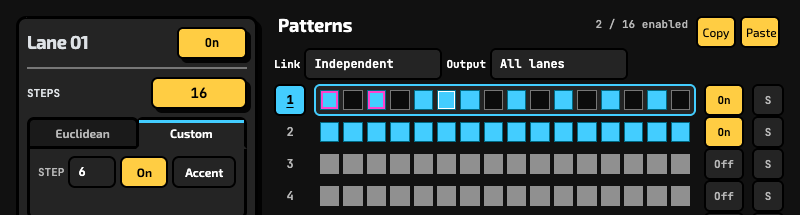
A magenta outline marks an accented hit.
Choose a note from your instrument.
In Note mode, arm one-shot MIDI Learn and play the key or pad you want the lane to trigger. MIDI Learn switches off after the note is received.
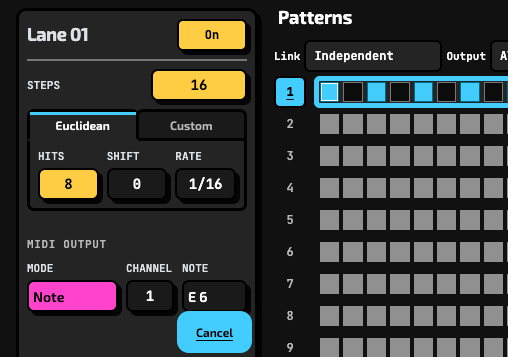
Cancel is shown while the lane waits for a note.
Use the lane for more than a fixed note.
Send notes, Arp Up/Down, Chord or MIDI CC. A per-lane LFO can vary note velocity or CC value. Arp and Chord require incoming MIDI notes.
One sequencer. Up to 16 independent MIDI lanes.
Give lanes different cycle lengths and rates, then build up the parts your arrangement calls for. RhyGenerator MK2 sends MIDI, not audio: route the plug-in’s MIDI output in a compatible DAW to a receiving track or instrument. Keep the drum sampler, synths and other MIDI-capable tools you already know; RhyGenerator MK2 supplies patterns, not sounds.
If your setup uses linked plug-in instances, they must run in the same process and use the same plug-in format. Assign each instance’s Output lane as required by the host routing.
Compatibility
Check your format and MIDI routing.
macOS
AU, VST3 and AAX. All the formats are universal (Intel and Apple Silicon).
Windows
64-bit VST3 and AAX. The editor requires Microsoft Edge WebView2 Runtime.
Host routing
Use a DAW that can route MIDI from the chosen plug-in format to an instrument. AU is supplied as a MIDI effect.
Version
2.0.0 · Full and free demo packages for macOS and Windows.
Before you download
Frequently asked questions
Does RhyGenerator MK2 make sound on its own?
No. It generates MIDI, not audio. Route the output in your DAW to a drum instrument, sampler, synth or another track that receives MIDI.
Do Arp Up, Arp Down and Chord need incoming MIDI?
Yes. Arp Up, Arp Down and Chord require MIDI notes from the host or track. Note and CC modes use the values set on the lane.
What’s limited in the free demo?
After 30 seconds of processing, MIDI output pauses for 2 seconds, then the cycle repeats. The demo does not restore plug-in settings from a saved DAW session.
Can I link an AU with a VST3 instance?
No. Linked instances need to be the same plug-in format and run in the same process. Choose the same Link group and set the desired Output lane in each instance.
Can I try it before buying?
Yes. Download the free demo and check the MIDI routing in your DAW with an instrument you know.
What if the plug-in isn’t right for my setup?
HoRNet offers a 15-day money-back guarantee. See the purchase terms for details.
Low prices, Great sound
Try one new rhythm in your next session.
Start with one Euclidean lane and an instrument you already use. Rotate the cycle, make any needed edits in Custom, and add another lane when the arrangement asks for it.
One-time purchase · HoRNet account downloads · 15-day money-back guarantee