
HoRNet ZeroLevel 1.0.0 is here. Capture during Play, analyze after Stop, and prepare a starting balance with coordinated track gains. €24.99, also included in ZeroBundle.
HoRNet ZeroLevel 1.0.0 is available now — our new automatic track-level adjustment plugin. It helps prepare a starting balance for the tracks you choose to coordinate, leaving the final mix decisions to you.
Before EQ, compression, and effects, there are the levels. A loud snare, a quiet guitar, and backing vocals that disappear behind the lead can make it difficult to judge the arrangement. That first pass is part of mixing, but it is also a stage where a little assistance can be useful.
ZeroLevel handles that stage with a specific workflow: capture during playback, analyze after Stop, then apply coordinated gains when the group is ready. It does not promise a finished mix, and it does not make every track equally loud. We designed it as a place to begin, not a replacement for listening.
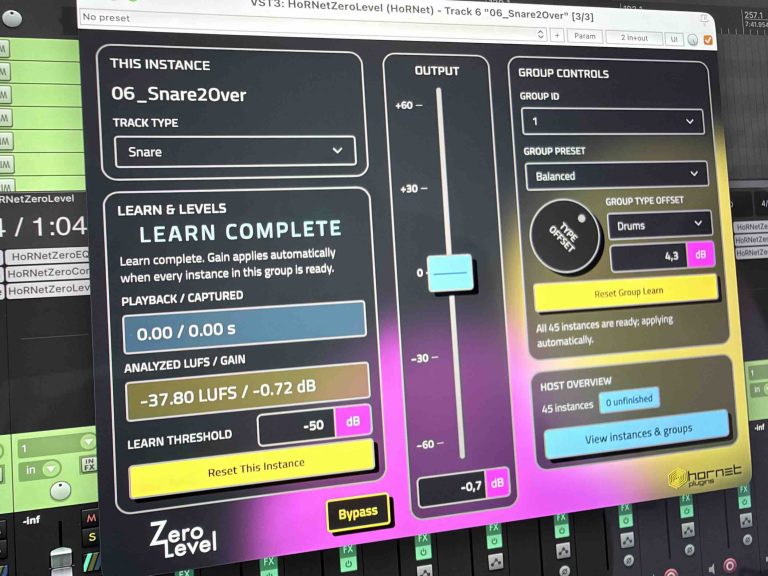
HoRNet ZeroLevel in REAPER.
Insert ZeroLevel on the tracks you want to coordinate and give them the same Group ID. A group is a set of plugin instances sharing an ID, not a bus. It does not change your routing.
A silent or unfinished instance can keep its group waiting. Other groups remain independent. Instances need to share the same host process and plugin module to coordinate.
ZeroLevel offers eight independent groups, nine shared presets, and source-type offsets of ±12 dB. Try Vocal Upfront, Rhythm Focus, or Guitar Heavy, then refine the result for your song.
A source offset affects that category within the selected group. Bring the guitars forward there without changing guitars assigned to another Group ID.
Preset, source-type, and offset changes do not require a new Learn. Valid analysis results are saved with the project, so you can return to the starting balance later.
ZeroLevel analyzes frequency bands to calculate its gain, but the audible output uses one smoothed global gain per instance. It does not apply EQ or compression, and it does not continuously follow each phrase or transient after Learn.
Changing levels can still affect how downstream compressors or saturation respond. Listen to the complete chain when reviewing the result.
Learn stores captured audio in RAM. Five minutes of stereo audio at 48 kHz uses about 220 MiB per instance, before temporary buffers. Long songs and large sessions can require substantial memory and several minutes of analysis after Stop.
ZeroLevel is €24.99 as a one-time purchase, with a free demo to check the workflow in your own setup.
The download contains VST3 and AAX versions for macOS and Windows, plus Audio Units for macOS. The Windows editor requires Microsoft Edge WebView2 Evergreen Runtime. Visit the ZeroLevel product page for details before buying.
ZeroLevel also joins ZeroBundle, which now includes all six Zero plugins: ZeroLevel, ZeroEQ, ZeroComp, ZeroBus, ZeroWidth, and ZeroLoud. Start with track levels, then continue through tone, dynamics, buses, stereo width, and loudness to build your mix quickly.
ZeroBundle is €29.99, compared with €149.94 for the six plugins separately — a saving of €119.95, or approximately 80%. Explore ZeroBundle if you want the complete Zero toolkit.
Explore ZeroLevel, try the demo, and review what a starting balance can do for your session. The final balance stays yours.
Low prices, Great sound
