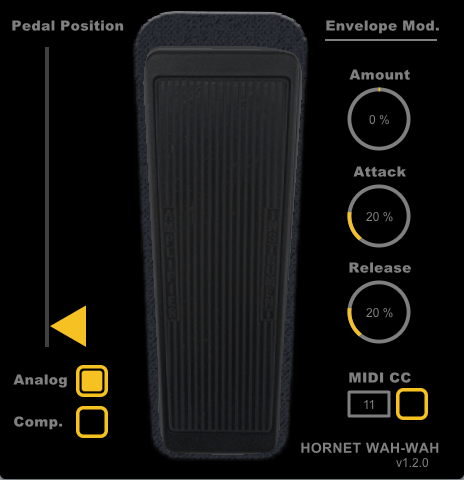
HoRNet Wah-Wah v1.3.1 fixes Audio Units validation on Apple Silicon Macs (M1/M2/M3) and removes VST 2.4 support. Free update for all users. Download now.
We’ve just released version 1.3.1 of HoRNet Wah-Wah, bringing an important compatibility fix for Mac users running Apple Silicon processors. If you’ve been experiencing validation issues with the Audio Units version on your M1, M2, or M3 Mac, this update solves that problem.
✓ Fixed
✓ Changed
If you’re working on a Mac with Apple Silicon and use Logic Pro, GarageBand, or any AU-compatible DAW, you may have encountered validation errors preventing Wah-Wah from loading properly. Version 1.3.1 addresses this issue completely.
What changed: We’ve updated the AU plugin architecture to meet Apple’s latest validation requirements for native Apple Silicon compatibility.
Why it matters: Your classic wah effect now loads instantly in your DAW without workarounds, giving you immediate access to that signature 70s funky sound in your productions.
Real-world benefit: No more frustration when opening sessions or switching between Intel and Apple Silicon Macs. Your workflow stays uninterrupted.
As part of our ongoing effort to maintain modern, efficient codebases, we’ve officially removed VST 2.4 support from Wah-Wah.
Why this change?
What you should do: If you’re still using VST 2.4 in your DAW, now’s the time to switch to VST3. All major DAWs (Cubase, FL Studio, Reaper, Studio One, Bitwig, etc.) fully support VST3 with improved performance and features.
Your presets are safe: All your existing presets will work perfectly with the VST3 version.
Update is free for all registered users.
HoRNet Wah-Wah remains our faithful digital recreation of the vintage 70s effect that defined funky guitar and keyboard sounds. With its analog-modeled resonant bandpass filter, variable distortion characteristics, and unique auto-wah envelope follower, it delivers that unmistakable sweep that modern filters can’t replicate.
Core features:
New to Wah-Wah? Check it out on our product page.
System Requirements:
Happy mixing! The HoRNet Team