


ChannelStripMK3 3.2.1 is available, this update is free for owners of the plugin and includes:
- Added support Apple Silicon to AAX format
The plugin for every track of your mix
The HoRNet ChannelStrip MK3 is a versatile plugin designed for every day use, we designed a tool that you can put on every channel and gives you one EQ and two dynamics processors, everything you usually need to achieve a sweet mix.
In addition to the Equalizer an Dynamics sections the ChannelStrip MK3 includes:
- Six different signal path routings (ex. Expander -> EQ -> compresor for a typical drum setup, or EQ -> FET compressor -> OPTO compressor for a typical vocal setup)
- Analog emulation that adds saturation (each model has a different saturation type) and other non linearities
- Oversampling where it matters, it means that each model has a different oversampling level when the option is activated so that the plugin always use least amount of CPU needed for the maximum quality
- Effective metering: every module has its own input and output meter and level trim and since everything is built around analog models we have put there VU Meters instead of peak meters.
- Input and output peak meters, in case you need to know the maximum peak of the signal
- Automatic gain staging, so that the plugin is fed with the perfect level for its internal analog engine
One sweet Equalizer
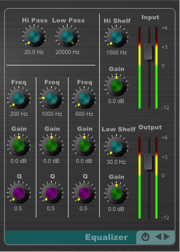 The HoRNet ChannelStrip MK3 features one equalizer with a very sweet tone that has the classic controls of a large console equalizer, but with some experience tuned EQ curves. The EQ in the ChannelStrip MK3 has:
- Hi pass and Low pass filters
- Hi Shelf inspired by the one found in a famous large console
- Low Shelf inspired by the peculiar response of a famous passive EQ
- Three parametric bands that with a wide Q range that can be used for tone shaping and surgical filtering
A compressor for every need
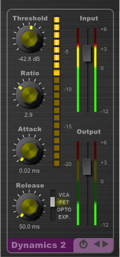 We fit two dynamics processors in the ChannelStrip MK3 so that you can compress as much as you want. Each module has four different compression models, each with its peculiar analog characteristic emulated:
- VCA: inspired by the common compressors found in consoles, solid state feed forward versatile compression
- FET: an emulation of the character of very fast vintage FET units, it’s a feedback compressor and can be very aggressive
- OPTO: inspired by a famous tube limiter, its feed forward and has a smooth response
- Expander: works as a traditional gate/expander based on a VCA design
Demo
The demo is fully functional except for the fact that every now and then it will silence out, you cannot save parameter values with your session and the plugin will not respond to automation coming from the host.
Features
- One equalizer with filters, shelves and 3 parametric filters
- Two dynamics processors
- Three compression models (VCA, FET, OPTO) and one expander.
- Six different routing options
- Analog emulation
- Automatic gain staging
- “RealGR” meter showing real speed gain reduction with peak hold.
- VU meters for each module, input and output peak meters with peak hold
- Global bypass with constant monitoring level (when auto output is used)
- Oversampling designed to be efficient
- macOS X (>=10.11) and Windows (Vista and later) support
- Apple Silicon native support
- 64bit only both on Mac and Windows
- Audio Units VST2.4, VST3 and AAX format
Copy protection
The HoRNet ChannelStrip MK3 has no copy protection, we don’t believe in copy protection, they are always cracked and they are annoying for the users, we all know you are not going to give away the plugin on the internet…
So simply download the plugin and enjoy your recordings!
This plugin sounds do great, but if a MK4 is planned, I’d like to see a mix knob in the dynamics section, a sidechain in the form of an LPF, HPF, and Bell in the middle frequency, THT, Preamp Tube or Tape, Gate and switchable EQ types (E/G). Then it would be probably the best channel strip ever. Greetings from Poland
It is my every day plugin for EQ and Compressors. I only use it in dialogues and it saves my time and life every day.
The high shelving is incredible. The OPTO Compressor works like a charm!
bought it for 5,99€…i like channel strips’ cause their look spread a professional feeling that keeps me wanting to learn the basic of mixing & frequencies..looking forward to try it out besides some other plugins from different brands when i do more music in hobby again
This is a decent channel strip. There seems to be audible stepping when moving any of the knobs when adjusting things as audio plays.
Also, the ui could do with a refresh and being re sizable. I love the other guis but this one doesn’t look the same design as the other plugins.
Oversampling(HQ) is useless. Frequency response will be worse, and aliasing due to the compressor will not be removed.
While I am happy with the fet and opto modes, I felt that a dry/wet knob would better utilize the saturation of this compressor.
I am satisfied with the sound in vca and exp modes. I also feel that the minimum release time should be shorter in vca mode.
I wish the filter should be separated from the equalizer and be able to be placed freely.
Other than that, I am very satisfied. It’s a nice plug-in for quick sound makeup.
Avrei preferito l'installazione singola di questo plugin, come hai fatto finora. Ho la sensazione di avere tutto piu sotto controllo….. OPS TROVATO l'INSTALLER… Errore mio 🙂
It sounds great on percussion and bass! It's a shame not to have the resizable GUI, although the size is more than acceptable. Great Strip!
Just bought it, and it sounds great. I can definitly recommend.
I would have loved to have sets of patches as well. Just to diale in on the right setting more easily.
I have had this plugin in my arsenal for about a year and used it only now on a mix. It is amazing. I really needed some air on a vocal and its high shelf boost is beautiful. It has a lovely smooth character. Very way to use and i will be using it regularly on my mixes.
The best channel strip. The Compressors I especially like.
Really really good!
Similar to other channel strips very expensive.
Gentle saturation, nice eq and very nice compressors.
7 filters of eq…
I'm a channel strip lover. And this one is the first channel strip that deserves my review. Maybe, better I keep quiet and save it as a secret weapon? OK, just because of Saverio – he is really cool guy. First impression – this one is the best glue for the master buss. Auto gain before and after just brilliant. Bypass implementation – the best I saw. It bypasses the processing only, and lets you compare "with" and "without" on the same loudness. The channel strip sounds very cool. There are some wishes for the MK4, namely side chain for compressors, de-esser, dry/wet knob, maybe something else, BUT if any of those new features will destroy the sound the channel strip has now, better to find a workaround and leave the plugin as it is. It seems like I've found "my" channel. Great work, Saverio!
This is one of the best channel strips and I've a good few none are as easy to dial in and find your sound as this one find myself using it so often just like the normaliser they go on virtually every track nowadays.
Italian craftsmanship at its best!
Two dynamic sections and the ability to control the signal flow order, this channel strip is awesome. I use it on everything from my tele, to drums and wurly,etc…
The auto gain feature in combo with the individual level meters make it so easy to control and dial in your sounds while maintaining good levels. Like switching gears on a Ferrari while listening to Joe pass and sitting next to a beautiful woman.
Thanks Saverio. Great work!
One of the best channelstrips available. The Auto gain mode is a godsend and the visual peak meter between modules helps me alot. The EQ module sounds sweet and not harsh.
An external sidechain support on one of the two compressor would be amazing!
I've been looking for a quick, no hassle, great sounding compressor for my recordings. These tracks are mainly guitars, bass, drums and keys in a pop/rock/blues style.
After trying literally dozens of compressors demos from large to small developers and lots of freeware, I eventually tried a few Hornet demos.
What a revelation, wow!
On guitars, I used the first compressor to catch the peaks with a fast attack and the second compressor, with relaxed settings to even out the audio, it worked a treat, that sound, yes.
I prefer these results to the E-Channel and British/White Channel I have from other developers. Should have saved some cash and tried Hornet first.
It works for me, its on the wish list, along with the Multicomp Plus MK2 and AnalogStage.
I've just purchased the Hornet tape.
Hornet plugins have a lot to offer at a fair price, I can't believe I overlooked them.
I've been using this for about a couple weeks now, even just running your audio thru it you're getting analog sound and you can get even more with the saturation button. The filters are smooth as well as the eq, I do wish there were 4 bands but other then that I have no complaints overall its a great plugin I love the fact that you can change the order of the eq & compressors and the compressors sound great as well !
best channelstrip. sounds like real console